Ver.1.3.0 releases August 27th, 2026.
Please check the list of changes below for details on the main improvements and fixes in this patch.
〇 Screen Settings Added
Screen settings have been added to the Options menu.
Under resolution settings in the screen settings, you can now select from 3 preset settings or a custom setting.
These settings cannot be changed after starting the game.
Some setups may experience some instability if these settings are changed.
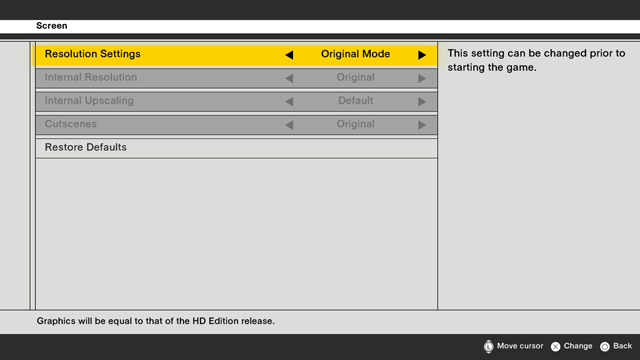
"Original Mode" Preset
Displays the game using the original HD Edition release graphics settings.
Upon selecting "Original Mode", the following settings will be applied.
Internal Resolution: Original
Internal Upscaling: Default
Movie: Original
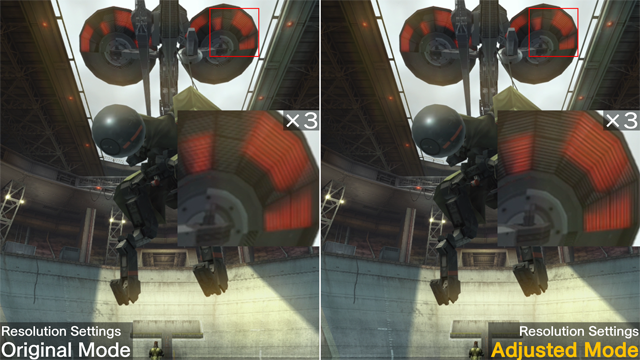
"Adjusted Mode" Preset
Displays the game at your current monitor’s highest possible resolution.
Has sharper visuals compared to Original Mode.
*Does not use high-resolution movie data.
Upon selecting "Adjusted Mode", the following settings will be applied.
Internal Resolution: FHD (1080p)
Internal Upscaling: Highest resolution possible from FHD (1080p), WQHD (1440p), or 4K (2160p).
Movie: Original
Listed below are the highest internal upscaling resolutions available for each system.
PlayStation(R) 5: 4K *1
*1 Actual internal resolution used may differ from one listed here depending on your setup.
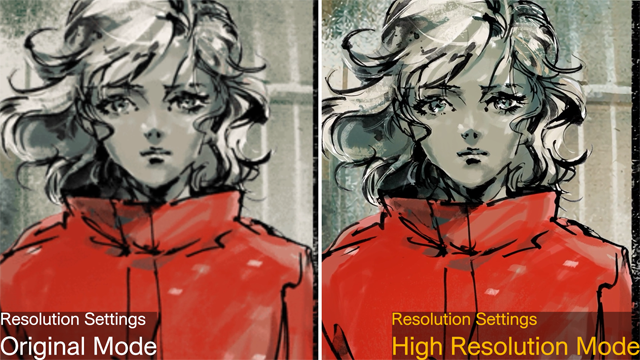
"High Resolution Mode" Preset
Uses high-resolution movie data to display the game at your current monitor’s highest possible resolution.
In addition to the "Adjusted Mode" settings, several movie scenes will be played using high-resolution movie data.
Upon selecting "High Resolution Mode", the following settings will be applied.
Internal Resolution: FHD (1080p)
Internal Upscaling: Highest resolution possible from FHD (1080p), WQHD (1440p), or 4K (2160p).
Movie: High Resolution
Listed below are the highest internal upscaling resolutions available for each system.
PlayStation(R) 5: 4K *1
*1 Actual internal resolution used may differ from one listed here depending on your setup.
"Custom" Preset
Internal resolution, internal upscaling, and movie settings can now all be adjusted to match your configurations.
1. Internal Resolution
Under "Internal Resolution", you can now choose to have the game render in FHD or at its original resolution.
Original: Renders in the game as it appears in the HD Edition.
FHD: Increases the game's internal resolution to FHD when rendering.
2. Internal Upscaling
Under "Internal Upscaling", you can now choose to use upscaling technology to enlarge the screen image to the maximum resolution suitable to your configurations.
Changing this setting will result in sharper visuals.
Note that depending on your setup, this may not be selectable.
Default: Displays the game using the conventional upscaling method.
FHD *1: Upscales to FHD using a method that differs from the conventional one. *2 *3
WQHD *1: Upscales to WQHD using a method that differs from the conventional one. *2 *3
4K *1: Upscales to 4K using a method that differs from the conventional one.
*1 May not be selectable depending on your setup.
*2 Results in sharp visuals.
*3 If the maximum resolution of your monitor is higher than the resolution you have set, the image will be upscaled using the conventional method up to its maximum resolution.
Listed below are the highest internal upscaling resolutions available for each system.
PlayStation(R) 5: 4K
3. Movies
In addition to the movie data from the original version, you can now choose a high-resolution version.
Setting the resolution to high will increase the resolution of certain movies.
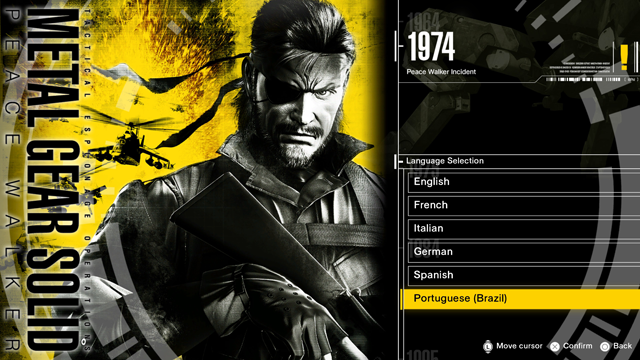
〇 Portuguese (Brazilian) Added.
Portuguese (Brazilian) has been added to the in-game languages.
Select Portuguese (Brazilian) from the start menu to play the game in Portuguese.
*If you have purchased the Japanese version of the game, you can set your in-game language to Portuguese (Brazilian) by installing the multilingual pack.
○ Fixed some other minor issues