R&D
Develop weapons and items to use during missions from R&D in the Mother Base Menu.
It is also possible to view the mechs acquired during missions.
| WEAPONS | Develop and view weapons. |
|---|---|
| ITEMS | Develop and view items. |
| MECHS |
View mechs acquired during missions.
|
| OTHER | View KEY ITEMS, BULLETS, and UNIFORMS. |
Development Trees
Select "WEAPON" or "ITEM" to view the development trees.
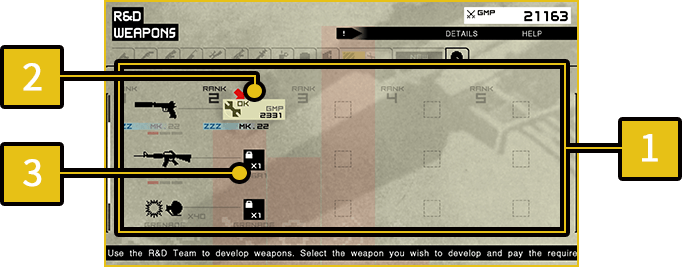
Weapons and items can be developed per the chart, starting from their lowest rank.
-
1
Development Trees
- The charts will be filled in as you develop new weapons/items and acquire design plans, which can largely be found during missions.
-
2
Developable Weapons & Items
- Weapons and items that meet team level requirements are displayed with an "OK" icon and be available to devleop.
GMP required for development is displayed in the lower right.
-
3
Undevelopable Weapons & Items
Development
Select a weapon/item available for development and pay the required GMP to start development.
Development progresses as you play MAIN OPS and EXTRA OPS missions, and will finish after a set amount of time has passed.
- Development stalls if GMP or team level become inadequate at any point. GMP can also be regained if development of a weapon/item is canceled.