Game Screen
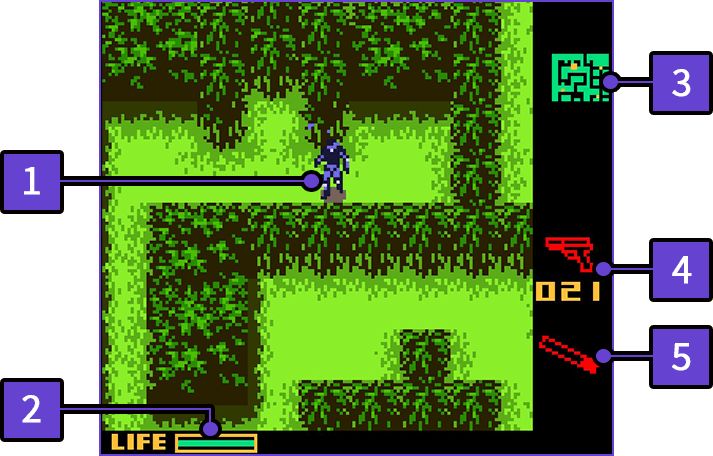
-
1
The Player Character
- This is "Solid Snake," the player's character.
-
2
Life Gauge
- Solid Snake's life indicator. If this gauge reaches 0, the game is over.
-
3
Radar
-
4
Your Equipped Weapon
- The icon for the weapon and number of remaining ammunition rounds are displayed.
-
5
Your Equipped Item
How to Read the Radar
The radar readout changes based on the Enemy Alert Level.
 |
Infiltration Mode Information on the surrounding area is displayed. The large, yellow dot is Snake, and smaller yellow dots represent enemies and surveillance cameras. |
|---|---|
 |
Alert Mode You'll be unable to use the radar when spotted by an enemy unit. |
 |
Evasion Mode Enemy units are on alert and are actively searching for Snake. When the counter reaches zero, it will change back to Infiltration Mode, but being spotted again will escalate the Alert Level to Alert Mode. |
 |
Frequency Jamming The radar is unusable due to frequency jamming. Electronic devices, such as surveillance cameras and remote-controlled missiles, will cease to function properly. |
Gauges Displayed Under Certain Conditions
O2 (Oxygen) Gauge

Life Gauges during Boss Fights
