Game Screen
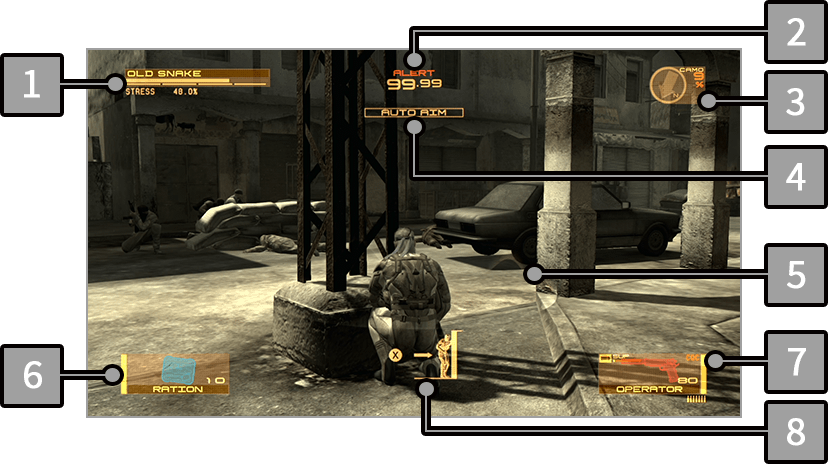
-
1
Life Gauge/Psyche Gauge/Stress Level
- Snake's Life Gauge, Psyche Gauge, and Stress Level are displayed under his name.
-
2
ENEMY ALERT PHASES
-
When Snake is found by an enemy, the current state (phase) is displayed. The countdown decreases over time and changes to the next phase when it reaches zero.
-
3
Destination/Wind Direction/Camo Index
-
You can check the direction of the destination
 and wind direction.
When the Solid Eye is equipped, the display switches to the baseline map.
In the upper right corner, the Camo Index is displayed.
-
4
AUTO AIM
- When AUTO AIM is turned on, the weapon will automatically aim at nearby enemies when raised; when it is turned off, the weapon can be used from an over-the-shoulder perspective.
- AUTO AIM is not available for some weapons.
-
5
Threat Ring
- The Threat Ring is displayed around Snake when he is crouching or crawling. It allows you to visualize and check surrounding threats.
-
6
Current Item
- The currently equipped item (equipment) is displayed. Rations and other consumables, as well as items such as Solid Eye and Metal Gear Mk. II, can be used.
-
7
Current Weapon
- The currently equipped weapon is displayed. Weapons can be aimed by holding
 , and used with
  .
.
-
8
Action Icon
- When
 is displayed on the screen, press to perform an action according to the situation.