MOTHER BASE
Mother Base
Press  while on the Mother Base screen to switch to the MISSION screen, and
  to switch to the SYSTEM screen. Press
  to enter the MODEL VIEWER and view the outside of Mother Base.
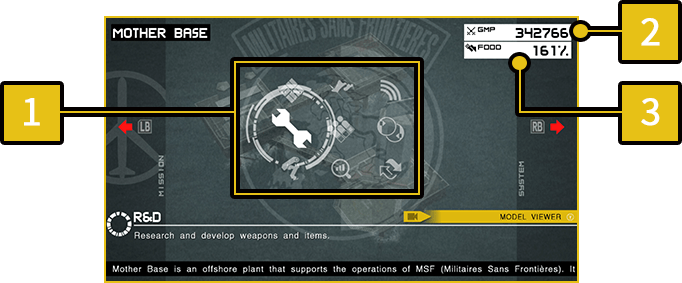
-
1
Mother Base Menu
-
2
GMP
- The currency used on Mother Base. GMP is required to develop new weapons and items.
Increase GMP by assigning staff to the Combat Unit.
-
3
FOOD
- The food supply on Mother Base. When the food supply is over 100%, soldier morale will increase and staff will work harder than their skills would normally allow. If the percentage is under 100%, morale will decrease and staff may desert.
As the number of staff at Mother Base increase, FOOD shortages may occur. This can be resolved by assigning staff to the Mess Hall Team.
SYSTEM Menu
Access the following menus by using to open the SYSTEM Menu.
| SAVE | Save game progress. |
|---|---|
| OPTIONS | Adjust various game settings. |
| KEY CONFIG | View button configuration during gameplay and adjust settings. |
| ONLINE MANUAL | Check the online manual. |
| TITLE | Return to the title menu. Note that game progress will not be saved when selecting this option. |
| BACK TO MAIN MENU | Close the game and return to the main menu. |
MOTHER BASE MENU
New features will be added to Mother Base with mission progress.
- There are additional features that are not described below.
DELIVERY
Pack weapons and items into a cardboard box and send them to other players. Cardboard boxes full of items can also be received here.
RECRUIT
Recruit volunteers for MSF. (There will be more applicants if you proactively play online).
Select "SOLDIER SEARCH"and a new mission (MSF Entrance Exam) will appear once there is a new applicant.
Clear this mission to recruit the applicant to MSF.
R&D
Develop new weapons and items.
STAFF
View staff and edit the team rosters.
VERSUS OPS
Play against other players.
DATABASE
View a variety of game data.
| MOTHER BASE DATA | View information on Mother Base's facilities and staff, as well as weapon and item stocks and a variety of other information. |
|---|---|
| PLAYER DATA | View player data ranging from battle statistics to a record of CO-OPS comrades. |
| LOG | View a record of events on Mother Base. The most recent 50 events are available. |
TRADE
It is possible to trade staff with other players. First, you will have to move staff you wish to trade to the Trade Waiting Room.
If you will be HOST for the trade, select "CREATE HOST" and wait for the traders to appear. Select "HOST SEARCH" to look for a trading session that has already been made.
Once you have successfully matched, select the staff you want and complete the trade.
- It is not possible to trade staff with a significant skill level different. You must select staff who's highest level skill is the same rank.