STAFF
View staff and assign them to the various teams from "STAFF" in the Mother Base Menu.
Assigned staff are able to assist missions in various ways.
About the Teams
Use  and
and  to switch between different teams and view the staff assigned to them.
and to switch between different teams and view the staff assigned to them.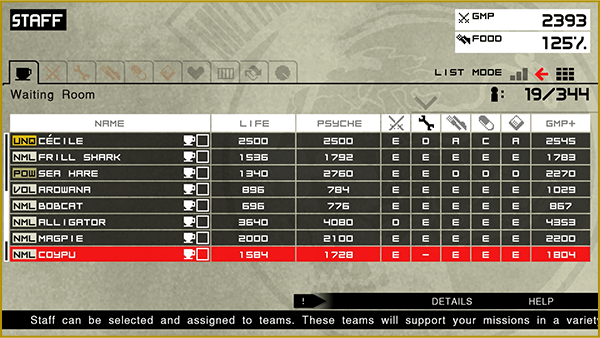
| Waiting Room | Staff unassigned to any team wait here. |
|---|---|
| Combat Unit | This team earns GMP. The higher the level, the more GMP it earns. |
| R&D Team | The higher the level, the faster this team can develop new weapons and items. Development speed also increases. |
| Mess Hall Team | The higher the level, the more FOOD this team can produce. It will also become possible to develop high rank Recovery Items. |
| Medical Team | The higher the level, the lower the rate of sickness and injury on Mother Base. Treatment speed will also increase and it will become possible to develop stronger tranquilizer guns. |
| Intel Team | It will become possible to develop radars and other items required in espionage. Leveling up this team allow strengthens Mother Base's ability to send supplies and engage in support attacks during missions. It can also provide information on enemies and prisoners within missions during preparations, as well as having other additional benefits. |
| Sickbay | Staff suffering from sickness, injury, or PTSD are treated here. |
| Brig | Enemies who remain aggressive are sent here to be persuaded to join Mother Base. Until they are persuaded, they are unable to join any of the other teams. |
| Trade Waiting Room | Staff meant to trade with other players are placed here. |
STAFF ASSIGNMENT
Select a staff member and press  to view team options and move them to a new team. Adding staff to teams will increase the level of the teams.
- Selecting "Discharge" will discharge the staff member from Mother Base. Discharged staff cannot join Mother Base again in the future.
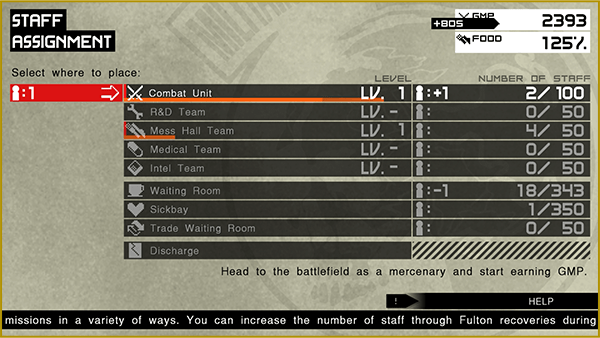
ASSIGNMENT TIPS
Staff can be effectively assigned to the various teams by sorting them by skill and assiging multiple staff at once. It is also possible to select "AUTO ASSIGN" from the Waiting Room to automatically assign staff to the different teams based on their abilities.
STAFF SKILLS
Select a staff member and press  to see detailed information on their skills.
- Check the meaning of the various icons by opening the game HELP menu.
-
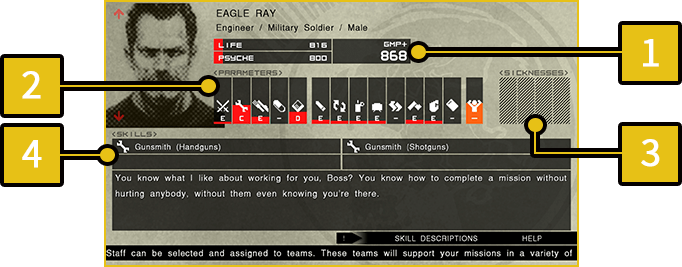
1
LIFE/PSYCHE/GMP+
-
LIFE Staff physical strength. Influences LIFE Gauge during missions. PSYCHE Staff stamina. Influences PSYCHE Gauge during missions. GMP+ Staff earnings. This amount will be added to the GMP if the staff member is assigned to the Combat Unit.
-
2
PARAMETERS
- The five parameters on the left indicate basic abilities. The eight parameters on the right indicate battle abilities.
Each ability is ranked from highest to lowest from S to E.
-
3
SICKNESS
- This icon appears based on staff physical condition.
-
4
SKILLS
- Certain staff have additional skills with special abilities.
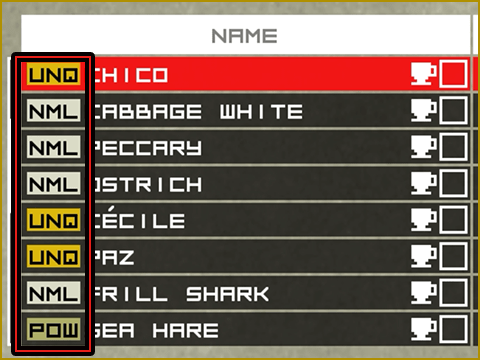
Staff Tags
An icon that indicates staff type.
Staff Grow
Staff assigned to the Combat Unit gain experience when missions are completed and their LIFE, MNTL, and GMP stats increase. When completeing missions with an MSF soldier instead of Snake, that soldier's stats will increase a large amount.